Viewing an internal Taskfire ticket
 Security and navigation
PERMISSIONS Autotask resources with access to Service Desk and the ticket's Line of Business, if any.
NAVIGATION Left Navigation Menu > Service Desk > Internal Taskfire Tickets > click a ticket number
NOTE If you are associated with at least one Line of Business, you must have access to the internal Taskfire ticket's Line of Business to view the ticket.
An internal Taskfire ticket looks different than a standard Autotask ticket. It will appear to you exactly as it does to the Client Portal user.
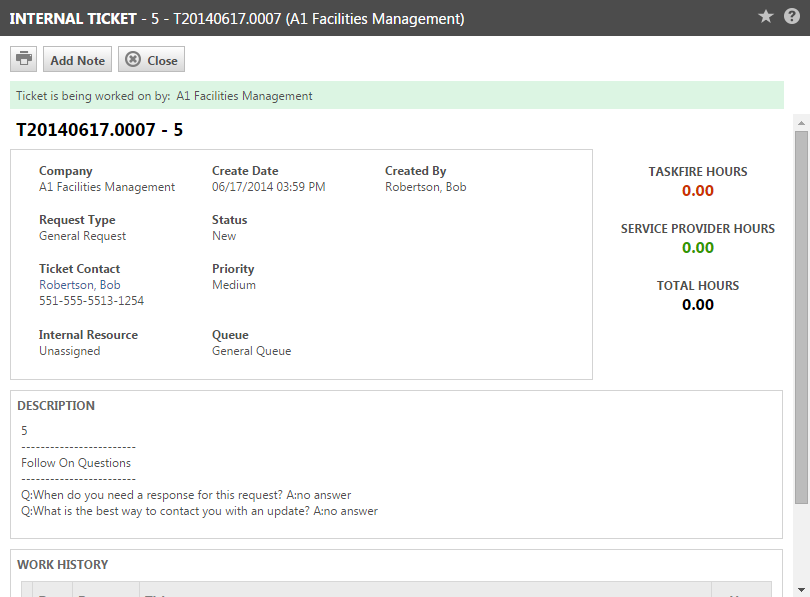
You can add a note to the ticket that the Taskfire users will be able to see in their version of the ticket in the Client Portal.
- To open the page, use the path(s) in the Security and navigation section above.
- On the Internal Taskfire Ticket page, click Add Note. The Add Note page opens.
- Type a Title for your note and the note text. The title will appear in the Work History list on the Service Request page and the note text will appear when the title is clicked.
- If you do not want the ticket contact notified of the new note, clear the Notify the ticket contact check box.
- Click OK.


